Choose access, create the link, then see the client open Facebook and approve inside Meta.
Start hereClick the hints.
The badges show what to try next. You will see the client link, Facebook login, and Meta approval screen.
1. Choose access2. Create link3. Client opens link4. Facebook login5. Approve in Meta
Live Simulator
AGENCY VIEW
Choose the access you need
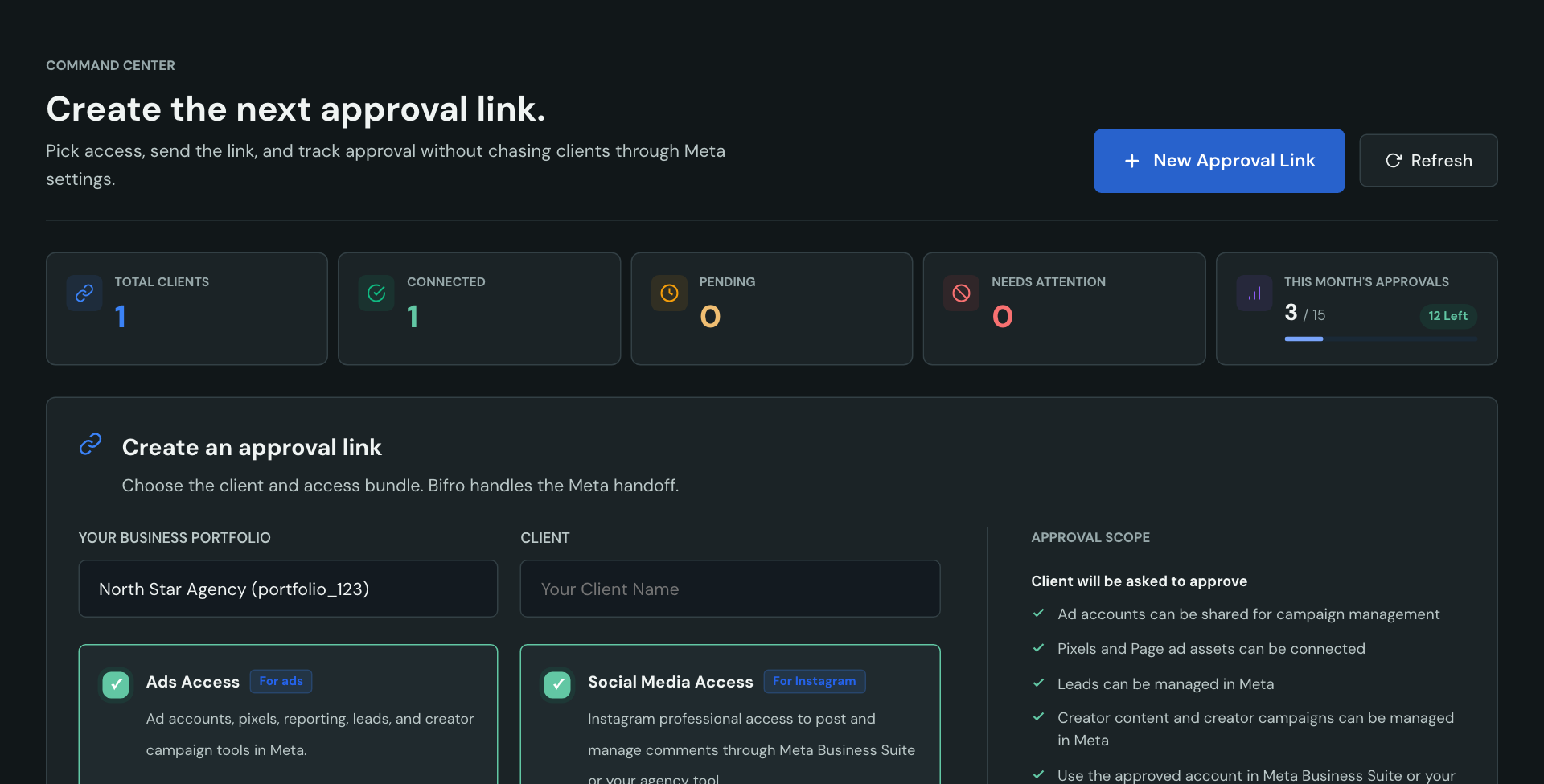
Pick ads, Instagram posting and comments, or both. The client approves only what you request.
Connecting to Meta API...
Securing authorization handshake...
bifro.connect/api/v25.0/handshake
Onboarding Link Ready!
Send this link to your client. They can approve it from their phone when they have time.
bifro.connect/invite/your-client-brand-3928Copy
bApproval Link OpenedYour Agency is requesting Meta access
Secure Link
This is the screen your client sees first. They can review the request before Facebook opens.
ClientClient Co.
AgencyYour Agency
AccessPage, ad account, pixel, and Instagram professional account
No password is typed into Bifro. The next tap sends the client to Facebook/Meta to sign in.
facebook.com/loginProtected by Meta
fFacebook LoginClient signs in with Facebook
If the client is already signed in, Facebook can skip this. If not, the password is entered on Facebook, not Bifro.
client.owner@example.com
••••••••••••
Meta Permission ScreenApprove selected business assets
Client controls this
Bifro Connect passes the requested access through Meta. The client confirms the assets they want to share.
✓Facebook PageManage approved Page content, leads, and creator campaign tools in Meta.
✓Ad Account + PixelRun campaigns, connect tracking, and read reporting.
✓Instagram Professional AccountPublishing and business access only. No Instagram DMs.
✓ Connection Successful!
Your agency can now manage the approved assets. The client never shared a password.
✓ Ad Account Shared
✓ FB Page Linked
✓ Pixel Connected
✓ Instagram Ready
Simple Approval Flow
The client sees the request before they approve.
Ads, Instagram, Pages, and business assets stay clear and separated.
Recommended for ads
Launch campaigns hours after closing, not days
Request ad accounts, pixels, Pages, reporting, leads, and creator campaign tools in one link.
More information ⌄
Useful when your team needs to launch campaigns, manage leads, work with creator content, and report from a clean client-approved connection.
Recommended for social
Start posting for clients without the setup call
Instagram professional account access for posting and comments. No DM access requested.
More information ⌄
Bifro handles the access handoff. It does not publish or moderate content itself, and Instagram inbox access is not requested.
Client friendly
One link. Client taps. Page is connected.
Page approvals stay understandable for business owners. No login sharing.
More information ⌄
Page approvals stay understandable for business owners because the request is separated from ads and publishing choices.
Easy follow-up
Send a fresh link to the same client
Restart approval without removing access your client has already granted.
More information ⌄
The new link stays tied to the same client portfolio. Clients can remove existing agency access in Meta Business Settings.
Trust model
Access is approved through Meta, then tracked in Bifro.
Client approvals create a visible connection record: pending, connected, or needing attention. Detailed security answers stay in the FAQ.
Agency
Meta
Client
Interactive Dashboard Demo
Dashboard
Billing
Settings
Monthly Approvals2/50
48 New Partnerships Left This Period
Calling Meta API...
Settings saved successfully!
Available
48
Connected
1
Pending
1
Needs attention
1
Client Partnerships
Client
Connected Assets
Status
Actions
YB
Client Co.
Ad AccountPagePixelInstagram
View Shared Assets Details
✓[Ad Account]Client Co. Ad Account
✓[Page]Client Co. Page
✓[Pixel]Client Co. Pixel
Connected
NC
Next Client
Waiting for client auth
Pending
PC
Client Two
Ad AccountPagePixel
View Shared Assets Details
✓[Ad Account]Past Client Ad Account
✓[Page]Past Client Facebook Page
✓[Pixel]Past Client Pixel
Needs attention
YB
Client Co.
Agency Co.
Connected
Created today
Ad AccountPagePixel
View Shared Assets Details
✓[Ad Account]Client Co. Ad Account
✓[Page]Client Co. Page
✓[Pixel]Client Co. Pixel
NC
Next Client
Agency Co.
Pending
Created today
Waiting for client auth
PC
Client Two
Agency Co.
Needs attention
Created today
Ad AccountPagePixel
View Shared Assets Details
✓[Ad Account]Past Client Ad Account
✓[Page]Past Client Facebook Page
✓[Pixel]Past Client Pixel
Billing & Plans
Manage portfolio billing and track monthly partnership approvals.
Current Subscription
Agency Plan
C$199.99 / month · Renews monthly
Active
Monthly Approval Usage2 / 50 Partnerships
Portfolio & Team
One membership and monthly approval allowance are shared across this Meta Business Portfolio.
See what setup calls costSlide Me
Estimate how much time and billable revenue your team loses when every client needs a manual access call.
Estimated annual savings
$6,000
Based on replacing manual access calls with one approval link for every new client.
5
$150/hr
3.3
Setup Hours / mo
$500
Estimated Time Cost / mo
Pricing Plans
Start free, then onboard more clients each month.
Choose how many new client partnerships one Meta Business Portfolio can approve each month. Existing partnerships stay connected.
All Pricing And Billing Are Natively In CAD
One portfolioYour team shares one membership
The plan belongs to one Meta Business Portfolio, not one employee account.
One monthly allowancePay for new approvals, not your client list
A pending link reserves an approval. Replace it before approval and the reservation moves to the fresh link.
No forced disconnectsExisting partnerships stay connected
Changing or cancelling a plan only changes future approval capacity.
Monthly BillingYearly Billing2 Months Free
Free
1 New Partnership / Month
C$0/month
1 New Client Partnership Each Month
Shared By One Meta Business Portfolio
No Credit Card Required
Ads And Instagram Access Requests
Existing Partnerships Stay Connected
Starter
5 New Partnerships / Month
C$599.88
C$49.99/mo
You Save C$99.98
5 New Client Partnerships Each Month
Shared By One Meta Business Portfolio
Ads And Instagram Access Requests
Existing Partnerships Stay Connected
Growth
15 New Partnerships / Month
C$1,199.88
C$99.99/mo
You Save C$199.98
15 New Client Partnerships Each Month
Shared By One Meta Business Portfolio
Ads And Instagram Access Requests
Priority Support
Agency
50 New Partnerships / Month
C$2,399.88
C$199.99/mo
You Save C$399.98
50 New Client Partnerships Each Month
Shared By One Meta Business Portfolio
Ads And Instagram Access Requests
Dedicated Support
First 100 Buyers
Founding Lifetime Access
Pay once for a permanent base of 10
new partnerships each month
Creating a link reserves an approval. Cancelling or letting an unused link expire returns it. A completed approval uses it for that monthly period..
Any monthly or annual subscription you add increases this base instead of replacing it. Core Bifro Connect access stays yours forever.
Limited to the first 100 founding portfolios.
C$999.99
C$999.99 one time · 10 approvals each month
Beyond Agency
Need more than 50 new partnerships a month?
Share your monthly onboarding volume and operational requirements. We will shape a Bespoke plan for larger agency networks and teams.
The product follows the real handoff from approval request to connected Meta assets, without pretending to replace Meta Business Suite.
01
Approval stays understandable
Your client sees whether you requested ads access, Instagram and Page access, or both before continuing to Meta.
02
The portfolio owns the plan
Everyone working inside the same Meta Business Portfolio shares its allowance. One Billing Owner controls plan changes.
03
Meta remains the source of truth
Posting, comment management, ads, and final access controls stay inside Meta Business Suite and Business Settings.
Swipe to explore
FAQ
Questions? We've got answers.
Bifro Connect gives agencies and marketing teams one secure link to send to a client. The client approves Facebook, Instagram, and ad access through Meta, so the team can start work without asking for passwords.
No. Clients log in through Meta, not Bifro. Your agency does not receive their Facebook password, and Bifro does not store Facebook passwords or 2FA codes.
Bifro records the agency-client connection and shows your team the approval status and asset handoff. You can create a fresh link for the same client portfolio if approval needs to be repeated.
Most clients approve once for the assets you requested. They may need to approve again if they remove access in Meta, your requested permissions change, their Meta access changes, or you need access to new assets.
Yes. Bifro gets the client's approval for the Instagram professional account. Your team then posts and manages comments through Meta Business Suite or another authorized agency tool. Bifro does not publish or moderate content itself.
No. Bifro Connect does not request Instagram message or inbox access. It only helps the client approve professional account access for posting and comment management in Meta Business Suite.
Yes. Your Meta business portfolio receives 1 new client-partnership approval each monthly period, with no credit card required. Existing approved partnerships remain connected.
Creating a link temporarily reserves one approval. Replacing a pending link moves its reservation to the fresh link; if an unused link expires, the reservation returns. Once the client approves the partnership, it is used for that period. Reconnecting the same two portfolios in that same period does not use another approval.
One client often pays your agency far more than the monthly cost of keeping their access organized. If Bifro saves even one onboarding call, it can pay for itself quickly.
The client can remove your agency's access in Meta Business Settings. Creating a fresh Bifro link does not remove existing access; it simply asks the same client portfolio to approve again.
Bifro does not store Facebook passwords or 2FA codes. We do store encrypted connection data needed to manage approved Meta access. Like any access-management tool, security matters, so tokens are encrypted, sensitive values are filtered from logs, and clients can remove agency access in Meta Business Settings.
Create your first approval link free.
Connect Meta once, choose the access you need, and send a clean approval request to your next client.